Skip to content

PolygonGlyph Class#

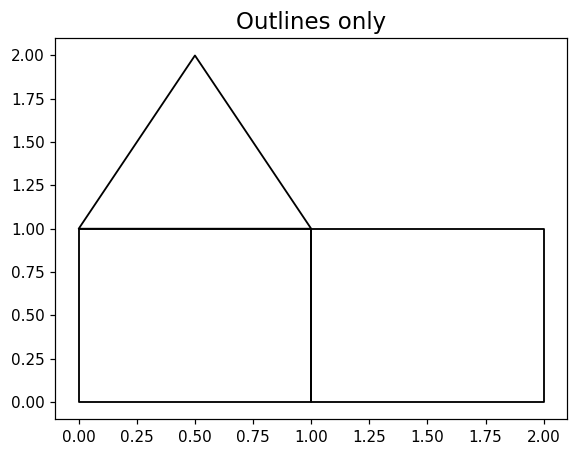
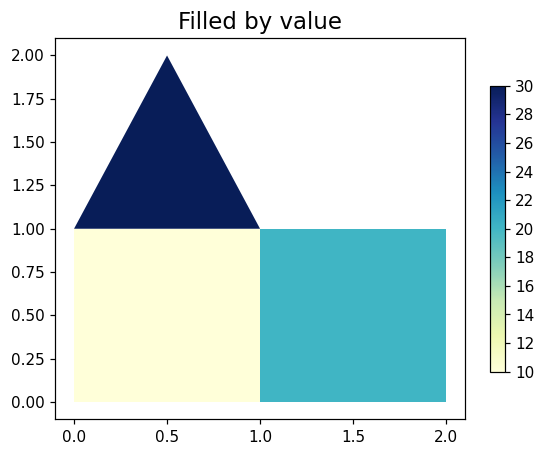
The PolygonGlyph class wraps matplotlib.collections.PolyCollection. With a per-polygon values array the polygons are filled and colour-mapped through the shared scalar-mapping pipeline and a colorbar is attached. With no values (or outline_only=True) only the polygon outlines are drawn.

Class Documentation#

cleopatra.polygon_glyph.PolygonGlyph #

Bases: Glyph

Visualization class for collections of polygons.

Wraps matplotlib.collections.PolyCollection. With a per-polygon values array, polygons are filled and colour-mapped through the shared scalar-mapping pipeline and a colorbar is attached. With no values (or outline_only=True), only the polygon outlines are drawn.

Parameters:

Name Type Description Default
polygons Sequence[ndarray]

Sequence of polygons, each an (n_i, 2) array of (x, y) vertices. Polygons may have differing vertex counts.

required
values ndarray | None

Optional 1D array of per-polygon scalar values for colour mapping. Must match the number of polygons when given. Default is None (outline-only).

None
ax Axes

Pre-existing axes to draw on. Default is None.

None
fig Figure

Pre-existing figure. Default is None.

None
**kwargs

Override any key in POLYGON_DEFAULT_OPTIONS (e.g. edgecolor, linewidth, cmap, vmin, vmax, levels, color_scale, ticks_spacing, cbar_label, figsize, title). Set add_colorbar=False to suppress the per-glyph colorbar (default True) for shared-axes composition where the host owns a single aggregated colorbar.

{}

Raises:

Type Description
ValueError

If values is given but its length does not match the number of polygons.

Examples:

  • Inspect the value array carried by the collection:
    >>> import numpy as np
    >>> from cleopatra.polygon_glyph import PolygonGlyph
    >>> polys = [
    ...     np.array([[0.0, 0.0], [1.0, 0.0], [0.5, 1.0]]),
    ...     np.array([[1.0, 0.0], [2.0, 0.0], [1.5, 1.0]]),
    ... ]
    >>> glyph = PolygonGlyph(polys, values=np.array([3.0, 7.0]))
    >>> fig, ax, pc = glyph.plot()
    >>> [float(v) for v in pc.get_array()]
    [3.0, 7.0]
    
See Also

cleopatra.glyph.Glyph._prepare_scalar_mapping: Shared norm/colorbar/ticks pipeline used for the filled path.

Source code in src/cleopatra/polygon_glyph.py
class PolygonGlyph(Glyph):
    """Visualization class for collections of polygons.

    Wraps `matplotlib.collections.PolyCollection`. With a per-polygon
    `values` array, polygons are filled and colour-mapped through the
    shared scalar-mapping pipeline and a colorbar is attached. With no
    values (or `outline_only=True`), only the polygon outlines are
    drawn.

    Args:
        polygons: Sequence of polygons, each an `(n_i, 2)` array of
            `(x, y)` vertices. Polygons may have differing vertex
            counts.
        values: Optional 1D array of per-polygon scalar values for
            colour mapping. Must match the number of polygons when
            given. Default is None (outline-only).
        ax: Pre-existing axes to draw on. Default is None.
        fig: Pre-existing figure. Default is None.
        **kwargs: Override any key in `POLYGON_DEFAULT_OPTIONS`
            (e.g. `edgecolor`, `linewidth`, `cmap`, `vmin`, `vmax`,
            `levels`, `color_scale`, `ticks_spacing`, `cbar_label`,
            `figsize`, `title`). Set `add_colorbar=False` to suppress the
            per-glyph colorbar (default True) for shared-axes composition
            where the host owns a single aggregated colorbar.

    Raises:
        ValueError: If `values` is given but its length does not match
            the number of polygons.

    Examples:
        - Inspect the value array carried by the collection:
            ```python
            >>> import numpy as np
            >>> from cleopatra.polygon_glyph import PolygonGlyph
            >>> polys = [
            ...     np.array([[0.0, 0.0], [1.0, 0.0], [0.5, 1.0]]),
            ...     np.array([[1.0, 0.0], [2.0, 0.0], [1.5, 1.0]]),
            ... ]
            >>> glyph = PolygonGlyph(polys, values=np.array([3.0, 7.0]))
            >>> fig, ax, pc = glyph.plot()
            >>> [float(v) for v in pc.get_array()]
            [3.0, 7.0]

            ```

    See Also:
        cleopatra.glyph.Glyph._prepare_scalar_mapping: Shared
            norm/colorbar/ticks pipeline used for the filled path.
    """

    #: Option keys this glyph accepts (see `Glyph.option_keys`/`filter_kwargs`).
    DEFAULT_OPTIONS = POLYGON_DEFAULT_OPTIONS

    def __init__(
        self,
        polygons: Sequence[np.ndarray],
        values: np.ndarray | None = None,
        *,
        ax: Axes = None,
        fig: Figure = None,
        **kwargs,
    ):
        super().__init__(
            default_options=POLYGON_DEFAULT_OPTIONS, fig=fig, ax=ax, **kwargs
        )
        self.polygons = [np.asarray(p, dtype=float) for p in polygons]
        if values is not None:
            values = np.asarray(values)
            if values.shape[0] != len(self.polygons):
                raise ValueError(
                    f"values length ({values.shape[0]}) must match the number "
                    f"of polygons ({len(self.polygons)})."
                )
        self.values = values
        self.cbar = None

    def plot(
        self,
        outline_only: bool = False,
        ax: Axes = None,
        title: str | None = None,
        add_colorbar: bool | None = None,
    ) -> tuple[Figure, Axes, PolyCollection]:
        """Draw the polygons, filling by value when present.

        When `values` was supplied and `outline_only` is False, the
        polygons are filled and colour-mapped through
        `_prepare_scalar_mapping` (so `vmin` / `vmax` / `levels` /
        `color_scale` apply) with a matching colorbar. Otherwise only
        the outlines are drawn and no colorbar is added.

        Args:
            outline_only: Draw unfilled outlines even when `values` is
                present (the `shapes` use case). Default is False.
            ax: Axes to draw on. Falls back to the axes supplied at
                construction, otherwise a new figure/axes is created.
            title: Plot title. Overrides `default_options["title"]`
                when given.
            add_colorbar: Override the `add_colorbar` option for this call
                — True draws the colorbar, False suppresses it (for
                shared-axes composition). Defaults to None, which keeps the
                value set at construction.

        Returns:
            tuple[Figure, Axes, PolyCollection]: The figure, the axes,
                and the `PolyCollection` added to the axes.

        Examples:
            - Outline-only mode carries no colour array and no colorbar:
                ```python
                >>> import numpy as np
                >>> from cleopatra.polygon_glyph import PolygonGlyph
                >>> polys = [np.array([[0.0, 0.0], [1.0, 0.0], [0.5, 1.0]])]
                >>> glyph = PolygonGlyph(polys, values=np.array([5.0]))
                >>> fig, ax, pc = glyph.plot(outline_only=True)
                >>> pc.get_array() is None
                True
                >>> glyph.cbar is None
                True

                ```
        """
        if ax is not None:
            self.ax = ax
            self.fig = ax.get_figure()
        elif self.ax is None:
            self.fig, self.ax = self.create_figure_axes()
        ax = self.ax
        opts = self.default_options

        if title is not None:
            opts["title"] = title
        # Resolve the colorbar choice for this call only (a plot-time
        # override does not persist into the glyph's options).
        draw_colorbar = (
            opts["add_colorbar"] if add_colorbar is None else add_colorbar
        )

        if outline_only or self.values is None:
            pc = PolyCollection(
                self.polygons,
                facecolors="none",
                edgecolors=opts["edgecolor"],
                linewidths=opts["linewidth"],
            )
            ax.add_collection(pc)
            ax.autoscale_view()
        else:
            norm, cbar_kw, ticks = self._prepare_scalar_mapping(self.values)
            pc = PolyCollection(
                self.polygons,
                array=np.asarray(self.values),
                cmap=opts["cmap"],
                norm=norm,
                edgecolors=opts["edgecolor"],
                linewidths=opts["linewidth"],
            )
            if norm is None:
                pc.set_clim(ticks[0], ticks[-1])
            ax.add_collection(pc)
            ax.autoscale_view()
            if draw_colorbar:
                self.cbar = self.create_color_bar(ax, pc, cbar_kw)

        if opts["title"]:
            ax.set_title(opts["title"], fontsize=opts["title_size"])

        return self.fig, ax, pc

plot(outline_only=False, ax=None, title=None, add_colorbar=None) #

Draw the polygons, filling by value when present.

When values was supplied and outline_only is False, the polygons are filled and colour-mapped through _prepare_scalar_mapping (so vmin / vmax / levels / color_scale apply) with a matching colorbar. Otherwise only the outlines are drawn and no colorbar is added.

Parameters:

Name Type Description Default
outline_only bool

Draw unfilled outlines even when values is present (the shapes use case). Default is False.

False
ax Axes

Axes to draw on. Falls back to the axes supplied at construction, otherwise a new figure/axes is created.

None
title str | None

Plot title. Overrides default_options["title"] when given.

None
add_colorbar bool | None

Override the add_colorbar option for this call — True draws the colorbar, False suppresses it (for shared-axes composition). Defaults to None, which keeps the value set at construction.

None

Returns:

Type Description
tuple[Figure, Axes, PolyCollection]

tuple[Figure, Axes, PolyCollection]: The figure, the axes, and the PolyCollection added to the axes.

Examples:

  • Outline-only mode carries no colour array and no colorbar:
    >>> import numpy as np
    >>> from cleopatra.polygon_glyph import PolygonGlyph
    >>> polys = [np.array([[0.0, 0.0], [1.0, 0.0], [0.5, 1.0]])]
    >>> glyph = PolygonGlyph(polys, values=np.array([5.0]))
    >>> fig, ax, pc = glyph.plot(outline_only=True)
    >>> pc.get_array() is None
    True
    >>> glyph.cbar is None
    True
    
Source code in src/cleopatra/polygon_glyph.py
def plot(
    self,
    outline_only: bool = False,
    ax: Axes = None,
    title: str | None = None,
    add_colorbar: bool | None = None,
) -> tuple[Figure, Axes, PolyCollection]:
    """Draw the polygons, filling by value when present.

    When `values` was supplied and `outline_only` is False, the
    polygons are filled and colour-mapped through
    `_prepare_scalar_mapping` (so `vmin` / `vmax` / `levels` /
    `color_scale` apply) with a matching colorbar. Otherwise only
    the outlines are drawn and no colorbar is added.

    Args:
        outline_only: Draw unfilled outlines even when `values` is
            present (the `shapes` use case). Default is False.
        ax: Axes to draw on. Falls back to the axes supplied at
            construction, otherwise a new figure/axes is created.
        title: Plot title. Overrides `default_options["title"]`
            when given.
        add_colorbar: Override the `add_colorbar` option for this call
            — True draws the colorbar, False suppresses it (for
            shared-axes composition). Defaults to None, which keeps the
            value set at construction.

    Returns:
        tuple[Figure, Axes, PolyCollection]: The figure, the axes,
            and the `PolyCollection` added to the axes.

    Examples:
        - Outline-only mode carries no colour array and no colorbar:
            ```python
            >>> import numpy as np
            >>> from cleopatra.polygon_glyph import PolygonGlyph
            >>> polys = [np.array([[0.0, 0.0], [1.0, 0.0], [0.5, 1.0]])]
            >>> glyph = PolygonGlyph(polys, values=np.array([5.0]))
            >>> fig, ax, pc = glyph.plot(outline_only=True)
            >>> pc.get_array() is None
            True
            >>> glyph.cbar is None
            True

            ```
    """
    if ax is not None:
        self.ax = ax
        self.fig = ax.get_figure()
    elif self.ax is None:
        self.fig, self.ax = self.create_figure_axes()
    ax = self.ax
    opts = self.default_options

    if title is not None:
        opts["title"] = title
    # Resolve the colorbar choice for this call only (a plot-time
    # override does not persist into the glyph's options).
    draw_colorbar = (
        opts["add_colorbar"] if add_colorbar is None else add_colorbar
    )

    if outline_only or self.values is None:
        pc = PolyCollection(
            self.polygons,
            facecolors="none",
            edgecolors=opts["edgecolor"],
            linewidths=opts["linewidth"],
        )
        ax.add_collection(pc)
        ax.autoscale_view()
    else:
        norm, cbar_kw, ticks = self._prepare_scalar_mapping(self.values)
        pc = PolyCollection(
            self.polygons,
            array=np.asarray(self.values),
            cmap=opts["cmap"],
            norm=norm,
            edgecolors=opts["edgecolor"],
            linewidths=opts["linewidth"],
        )
        if norm is None:
            pc.set_clim(ticks[0], ticks[-1])
        ax.add_collection(pc)
        ax.autoscale_view()
        if draw_colorbar:
            self.cbar = self.create_color_bar(ax, pc, cbar_kw)

    if opts["title"]:
        ax.set_title(opts["title"], fontsize=opts["title_size"])

    return self.fig, ax, pc

Examples#

Value-filled polygons#

import numpy as np
from cleopatra.polygon_glyph import PolygonGlyph

polygons = [
    np.array([[0.0, 0.0], [1.0, 0.0], [1.0, 1.0], [0.0, 1.0]]),
    np.array([[1.0, 0.0], [2.0, 0.0], [2.0, 1.0], [1.0, 1.0]]),
    np.array([[0.0, 1.0], [1.0, 1.0], [0.5, 2.0]]),
]
values = np.array([10.0, 20.0, 30.0])

pg = PolygonGlyph(polygons, values=values)
fig, ax, pc = pg.plot(title="Polygons by value")
Outlines only#

pg = PolygonGlyph(polygons)
fig, ax, pc = pg.plot(outline_only=True)