Lumped Model Run#
Or drive it from a YAML file
Everything this page assembles in Python can live in a run configuration instead --
one file holding the paths, dates and settings, read by Catchment.from_yaml. See
Run configuration.
To run the HBV lumped model inside Hapi you need to prepare the meteorological inputs (rainfall, temperature and potential evapotranspiration), HBV parameters, and the HBV model (you can load Bergström, 1992 version of HBV from Hapi )
- First load the prepared lumped version of the HBV module inside Hapi, the triangular routing function and the wrapper function that runs the lumped model
RUN.
from hapi.rrm.hbv_bergestrom92 import HBVBergestrom92 as HBVLumped
from hapi.run import Run
from hapi.catchment import Catchment
from hapi.routing import Routing
Parameterpath = Comp + "/data/lumped/Coello_Lumped2021-03-08_muskingum.txt"
MeteoDataPath = Comp + "/data/lumped/meteo_data-MSWEP.csv"

### meteorological data
start = "2009-01-01"
end = "2011-12-31"
name = "Coello"
Coello = Catchment(name, start, end)
Coello.read_lumped_inputs(MeteoDataPath)
start = "2009-01-01"
end = "2011-12-31"
name = "Coello"
Coello = Catchment(name, start, end)
Coello.read_lumped_inputs(MeteoDataPath)
# catchment area
AreaCoeff = 1530
# [Snow pack, Soil moisture, Upper zone, Lower Zone, Water content]
InitialCond = [0,10,10,10,0]

Coello.read_lumped_model(HBVLumped, AreaCoeff, InitialCond)
Snow = 0 # no snow subroutine
# if routing using Maxbas True, if Muskingum False
Coello.read_parameters(Parameterpath, Snow)
# RoutingFn = Routing.triangular_routing_2
RoutingFn = Routing.muskingum_v
Route = 1
run_lumped wrapper to initiate the calculation
Run.run_lumped(Coello, Route, RoutingFn)
statista.descriptors contains some
metrics like rmse, nse, kge and wb , you need to load it, a measured time series of doscharge for the same
period of the simulation is also needed for the comparison.
all methods in statista.descriptors takes two numpy arrays of the same length and return real number.
import statista.descriptors as metrics

# The observed record has to be read before it can be scored against; the page never
# loaded it, so `QGauges` was `None`.
Coello.read_discharge_gauges(Path + "Qout_c.csv", fmt="%Y-%m-%d")

Metrics = dict()
Qobs = Coello.QGauges['q']

Metrics['RMSE'] = metrics.rmse(Qobs, Coello.Qsim['q'])
Metrics['NSE'] = metrics.nse(Qobs, Coello.Qsim['q'])
Metrics['NSEhf'] = metrics.nse_hf(Qobs, Coello.Qsim['q'])
Metrics['KGE'] = metrics.kge(Qobs, Coello.Qsim['q'])
Metrics['WB'] = metrics.wb(Qobs, Coello.Qsim['q'])

print("RMSE= " + str(round(Metrics['RMSE'],2)))
print("NSE= " + str(round(Metrics['NSE'],2)))
print("NSEhf= " + str(round(Metrics['NSEhf'],2)))
print("KGE= " + str(round(Metrics['KGE'],2)))
print("WB= " + str(round(Metrics['WB'],2)))
gaugei = 0
plotstart = "2009-01-01"
plotend = "2011-12-31"
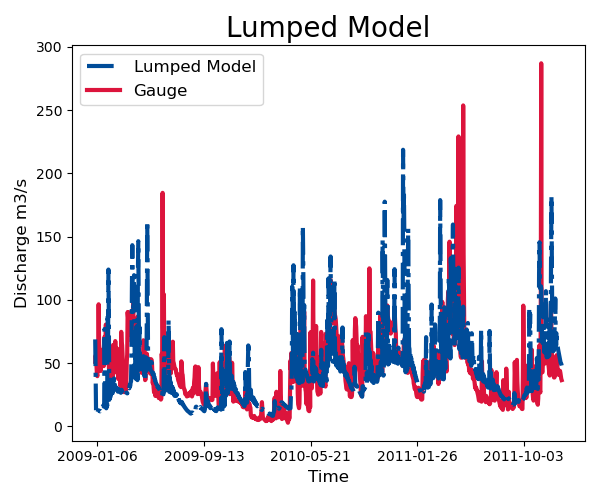
Coello.plot_hydrograph(plotstart, plotend, gaugei, title="Lumped Model")
- To save the results
start = "2009-01-01"
end = "2010-04-20"

Path = SaveTo + "Results-Lumped-Model" + str(dt.datetime.now())[0:10] + ".txt"
Coello.results.save(result=5, start=start, end=end, path=Path)